

200+ Roleplay, Creative Writing, Uncensored, NSFW models.
Collection
Oldest models listed first, with Newest models at bottom of the page. Most repos have full examples, instructions, best settings and so on. • 281 items • Updated • 811
[examples to be added] [BENCHMARKS coming soon.]

This model contains the full source of the original "Qwen3-VL-Thinking-8B" coupled with Brainstorm 20x adapter (by DavidAU) with augmented GGUF quants (NEO Imatrix) with MAX 16 bit output tensor.
This is the full image/text/multi-modal model AND fully tested.
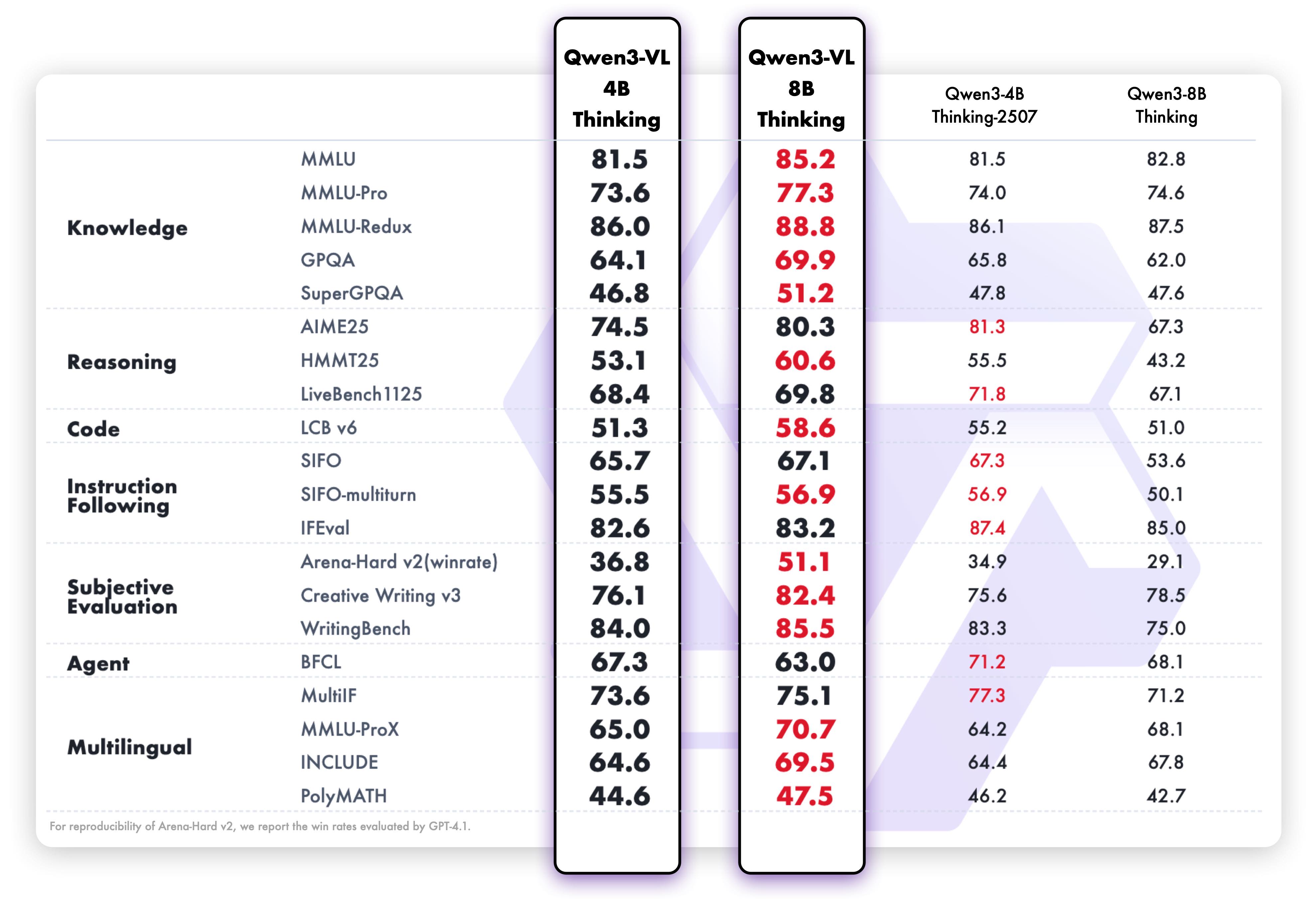
Brainstorm 20x will augment text generation as well as "image" description and in many cases raises the raw benchmarks of the model (which are already very impressive (see below) ) too.
Brainstorm also augments "thinking" too.
Addition of the Brainstorm adapter has altered the model from 8B to 12B (now with 55 layers and 608 tensors).
GGUFs further enhanced with NEO IMATRIX dataset, and MAX output tensor (makes up 10-20% of model output quality) set at 16 bits.
Note that Q8_0 will only have MAX output tensor at 16 bits, as Imatrix has no effect on this quant.
IMPORTANT: - Looping?
This model tends to loop sometimes, if this happens set temp to "1" (or higher) and rep pen to "1.1" . The org model has the same issue. If you have the option, set "presence penalty" to 2.0 [as per Qwen's own suggestions]
IMPORTANT => GGUF QUANTS:
You need both the GGUF quant(s) AND the special "mmproj" gguf quant (ONE: Q8,F16,BF16 or F32) to use all functions with this model.
Save these to the SAME folder.
In LMStudio, the app will auto-detect the "mmproj" file, and new options will be available.
For Koldboldcpp you have to load the GGUF and the "mmproj" file [this is in two separate sections in the loader].
(Quants, Benchmarks, Brainstorm details, org model details from Qwen, and then help section)
This model requires:
Settings used for testing (suggested):
This model will respond well to both detailed instructions and step by step refinement and additions to code.
Likewise for creative use cases.
As this is an instruct model, it will also benefit from a detailed system prompt too.
For simpler coding problems, lower quants will work well; but for complex/multi-step problem solving suggest Q6 or Q8.
BENCHMARKS by Nightmedia (also makes MLX quants too)
https://huggingface.co/nightmedia/
Brainstorm 20x
The BRAINSTORM process was developed by David_AU.
Some of the core principals behind this process are discussed in this scientific paper : Progressive LLaMA with Block Expansion .
However I went in a completely different direction from what was outlined in this paper.
What is "Brainstorm" ?
The reasoning center of an LLM is taken apart, reassembled, and expanded.
In this case for this model: 20 times
Then these centers are individually calibrated. These "centers" also interact with each other. This introduces subtle changes into the reasoning process. The calibrations further adjust - dial up or down - these "changes" further. The number of centers (5x,10x etc) allow more "tuning points" to further customize how the model reasons so to speak.
The core aim of this process is to increase the model's detail, concept and connection to the "world", general concept connections, prose quality and prose length without affecting instruction following.
This will also enhance any creative use case(s) of any kind, including "brainstorming", creative art form(s) and like case uses.
Here are some of the enhancements this process brings to the model's performance:
Other "lab" observations:
The process to modify the model occurs at the root level - source files level. The model can quanted as a GGUF, EXL2, AWQ etc etc.
Meet Qwen3-VL — the most powerful vision-language model in the Qwen series to date.
This generation delivers comprehensive upgrades across the board: superior text understanding & generation, deeper visual perception & reasoning, extended context length, enhanced spatial and video dynamics comprehension, and stronger agent interaction capabilities.
Available in Dense and MoE architectures that scale from edge to cloud, with Instruct and reasoning‑enhanced Thinking editions for flexible, on‑demand deployment.
Visual Agent: Operates PC/mobile GUIs—recognizes elements, understands functions, invokes tools, completes tasks.
Visual Coding Boost: Generates Draw.io/HTML/CSS/JS from images/videos.
Advanced Spatial Perception: Judges object positions, viewpoints, and occlusions; provides stronger 2D grounding and enables 3D grounding for spatial reasoning and embodied AI.
Long Context & Video Understanding: Native 256K context, expandable to 1M; handles books and hours-long video with full recall and second-level indexing.
Enhanced Multimodal Reasoning: Excels in STEM/Math—causal analysis and logical, evidence-based answers.
Upgraded Visual Recognition: Broader, higher-quality pretraining is able to “recognize everything”—celebrities, anime, products, landmarks, flora/fauna, etc.
Expanded OCR: Supports 32 languages (up from 19); robust in low light, blur, and tilt; better with rare/ancient characters and jargon; improved long-document structure parsing.
Text Understanding on par with pure LLMs: Seamless text–vision fusion for lossless, unified comprehension.
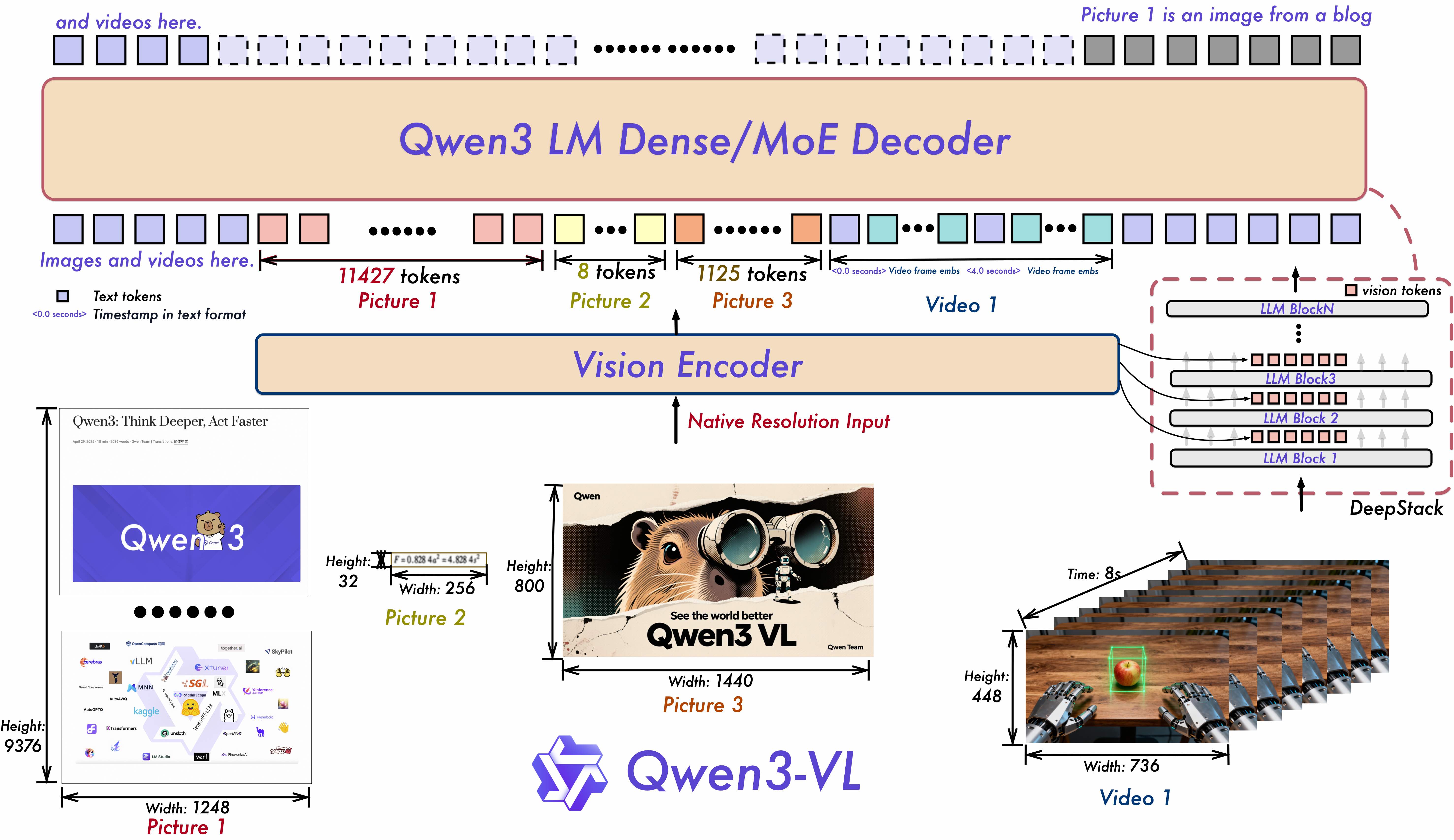
Interleaved-MRoPE: Full‑frequency allocation over time, width, and height via robust positional embeddings, enhancing long‑horizon video reasoning.
DeepStack: Fuses multi‑level ViT features to capture fine‑grained details and sharpen image–text alignment.
Text–Timestamp Alignment: Moves beyond T‑RoPE to precise, timestamp‑grounded event localization for stronger video temporal modeling.
This is the weight repository for Qwen3-VL-8B-Thinking.
Multimodal performance

Pure text performance
Below, we provide simple examples to show how to use Qwen3-VL with 🤖 ModelScope and 🤗 Transformers.
The code of Qwen3-VL has been in the latest Hugging face transformers and we advise you to build from source with command:
pip install git+https://github.com/huggingface/transformers
# pip install transformers==4.57.0 # currently, V4.57.0 is not released
Here we show a code snippet to show you how to use the chat model with transformers:
from transformers import Qwen3VLForConditionalGeneration, AutoProcessor

# default: Load the model on the available device(s)
model = Qwen3VLForConditionalGeneration.from_pretrained(
    "Qwen/Qwen3-VL-8B-Thinking", dtype="auto", device_map="auto"
)

# We recommend enabling flash_attention_2 for better acceleration and memory saving, especially in multi-image and video scenarios.
# model = Qwen3VLForConditionalGeneration.from_pretrained(
#     "Qwen/Qwen3-VL-8B-Thinking",
#     dtype=torch.bfloat16,
#     attn_implementation="flash_attention_2",
#     device_map="auto",
# )

processor = AutoProcessor.from_pretrained("Qwen/Qwen3-VL-8B-Thinking")

messages = [
    {
        "role": "user",
        "content": [
            {
                "type": "image",
                "image": "https://qianwen-res.oss-cn-beijing.aliyuncs.com/Qwen-VL/assets/demo.jpeg",
            },
            {"type": "text", "text": "Describe this image."},
        ],
    }
]

# Preparation for inference
inputs = processor.apply_chat_template(
    messages,
    tokenize=True,
    add_generation_prompt=True,
    return_dict=True,
    return_tensors="pt"
)
inputs = inputs.to(model.device)

# Inference: Generation of the output
generated_ids = model.generate(**inputs, max_new_tokens=128)
generated_ids_trimmed = [
    out_ids[len(in_ids) :] for in_ids, out_ids in zip(inputs.input_ids, generated_ids)
]
output_text = processor.batch_decode(
    generated_ids_trimmed, skip_special_tokens=True, clean_up_tokenization_spaces=False
)
print(output_text)
export greedy='false'
export top_p=0.95
export top_k=20
export repetition_penalty=1.0
export presence_penalty=0.0
export temperature=1.0
export out_seq_length=40960
export greedy='false'
export top_p=0.95
export top_k=20
export repetition_penalty=1.0
export presence_penalty=1.5
export temperature=1.0
export out_seq_length=32768 (for aime, lcb, and gpqa, it is recommended to set to 81920)
CHANGE THE NUMBER OF ACTIVE EXPERTS:
See this document:
https://huggingface.co/DavidAU/How-To-Set-and-Manage-MOE-Mix-of-Experts-Model-Activation-of-Experts
Settings: CHAT / ROLEPLAY and/or SMOOTHER operation of this model:
In "KoboldCpp" or "oobabooga/text-generation-webui" or "Silly Tavern" ;
Set the "Smoothing_factor" to 1.5
: in KoboldCpp -> Settings->Samplers->Advanced-> "Smooth_F"
: in text-generation-webui -> parameters -> lower right.
: In Silly Tavern this is called: "Smoothing"
NOTE: For "text-generation-webui"
-> if using GGUFs you need to use "llama_HF" (which involves downloading some config files from the SOURCE version of this model)
Source versions (and config files) of my models are here:
OTHER OPTIONS:
Increase rep pen to 1.1 to 1.15 (you don't need to do this if you use "smoothing_factor")
If the interface/program you are using to run AI MODELS supports "Quadratic Sampling" ("smoothing") just make the adjustment as noted.
Highest Quality Settings / Optimal Operation Guide / Parameters and Samplers
This a "Class 1" model:
For all settings used for this model (including specifics for its "class"), including example generation(s) and for advanced settings guide (which many times addresses any model issue(s)), including methods to improve model performance for all use case(s) as well as chat, roleplay and other use case(s) please see:
You can see all parameters used for generation, in addition to advanced parameters and samplers to get the most out of this model here:
2-bit
3-bit
4-bit
5-bit
6-bit
8-bit