

Instructions to use baichuan-inc/Baichuan-M3-235B-Q4_K_M-GGUF with libraries, inference providers, notebooks, and local apps. Follow these links to get started.
- Libraries
- Transformers
How to use baichuan-inc/Baichuan-M3-235B-Q4_K_M-GGUF with Transformers:
# Use a pipeline as a high-level helper from transformers import pipeline pipe = pipeline("text-generation", model="baichuan-inc/Baichuan-M3-235B-Q4_K_M-GGUF") messages = [ {"role": "user", "content": "Who are you?"}, ] pipe(messages)# Load model directly from transformers import AutoModel model = AutoModel.from_pretrained("baichuan-inc/Baichuan-M3-235B-Q4_K_M-GGUF", dtype="auto") - llama-cpp-python
How to use baichuan-inc/Baichuan-M3-235B-Q4_K_M-GGUF with llama-cpp-python:
# !pip install llama-cpp-python from llama_cpp import Llama llm = Llama.from_pretrained( repo_id="baichuan-inc/Baichuan-M3-235B-Q4_K_M-GGUF", filename="baichuan-m3-235b-q4_k_m-00001-of-00010.gguf", )
llm.create_chat_completion( messages = [ { "role": "user", "content": "What is the capital of France?" } ] ) - Notebooks
- Google Colab
- Kaggle
- Local Apps Settings
- llama.cpp
How to use baichuan-inc/Baichuan-M3-235B-Q4_K_M-GGUF with llama.cpp:
Install from brew
brew install llama.cpp # Start a local OpenAI-compatible server with a web UI: llama-server -hf baichuan-inc/Baichuan-M3-235B-Q4_K_M-GGUF:Q4_K_M # Run inference directly in the terminal: llama-cli -hf baichuan-inc/Baichuan-M3-235B-Q4_K_M-GGUF:Q4_K_M
Install from WinGet (Windows)
winget install llama.cpp # Start a local OpenAI-compatible server with a web UI: llama-server -hf baichuan-inc/Baichuan-M3-235B-Q4_K_M-GGUF:Q4_K_M # Run inference directly in the terminal: llama-cli -hf baichuan-inc/Baichuan-M3-235B-Q4_K_M-GGUF:Q4_K_M
Use pre-built binary
# Download pre-built binary from: # https://github.com/ggerganov/llama.cpp/releases # Start a local OpenAI-compatible server with a web UI: ./llama-server -hf baichuan-inc/Baichuan-M3-235B-Q4_K_M-GGUF:Q4_K_M # Run inference directly in the terminal: ./llama-cli -hf baichuan-inc/Baichuan-M3-235B-Q4_K_M-GGUF:Q4_K_M
Build from source code
git clone https://github.com/ggerganov/llama.cpp.git cd llama.cpp cmake -B build cmake --build build -j --target llama-server llama-cli # Start a local OpenAI-compatible server with a web UI: ./build/bin/llama-server -hf baichuan-inc/Baichuan-M3-235B-Q4_K_M-GGUF:Q4_K_M # Run inference directly in the terminal: ./build/bin/llama-cli -hf baichuan-inc/Baichuan-M3-235B-Q4_K_M-GGUF:Q4_K_M
Use Docker
docker model run hf.co/baichuan-inc/Baichuan-M3-235B-Q4_K_M-GGUF:Q4_K_M
- LM Studio
- Jan
- vLLM
How to use baichuan-inc/Baichuan-M3-235B-Q4_K_M-GGUF with vLLM:
Install from pip and serve model
# Install vLLM from pip: pip install vllm # Start the vLLM server: vllm serve "baichuan-inc/Baichuan-M3-235B-Q4_K_M-GGUF" # Call the server using curl (OpenAI-compatible API): curl -X POST "http://localhost:8000/v1/chat/completions" \ -H "Content-Type: application/json" \ --data '{ "model": "baichuan-inc/Baichuan-M3-235B-Q4_K_M-GGUF", "messages": [ { "role": "user", "content": "What is the capital of France?" } ] }'Use Docker
docker model run hf.co/baichuan-inc/Baichuan-M3-235B-Q4_K_M-GGUF:Q4_K_M
- SGLang
How to use baichuan-inc/Baichuan-M3-235B-Q4_K_M-GGUF with SGLang:
Install from pip and serve model
# Install SGLang from pip: pip install sglang # Start the SGLang server: python3 -m sglang.launch_server \ --model-path "baichuan-inc/Baichuan-M3-235B-Q4_K_M-GGUF" \ --host 0.0.0.0 \ --port 30000 # Call the server using curl (OpenAI-compatible API): curl -X POST "http://localhost:30000/v1/chat/completions" \ -H "Content-Type: application/json" \ --data '{ "model": "baichuan-inc/Baichuan-M3-235B-Q4_K_M-GGUF", "messages": [ { "role": "user", "content": "What is the capital of France?" } ] }'Use Docker images
docker run --gpus all \ --shm-size 32g \ -p 30000:30000 \ -v ~/.cache/huggingface:/root/.cache/huggingface \ --env "HF_TOKEN=<secret>" \ --ipc=host \ lmsysorg/sglang:latest \ python3 -m sglang.launch_server \ --model-path "baichuan-inc/Baichuan-M3-235B-Q4_K_M-GGUF" \ --host 0.0.0.0 \ --port 30000 # Call the server using curl (OpenAI-compatible API): curl -X POST "http://localhost:30000/v1/chat/completions" \ -H "Content-Type: application/json" \ --data '{ "model": "baichuan-inc/Baichuan-M3-235B-Q4_K_M-GGUF", "messages": [ { "role": "user", "content": "What is the capital of France?" } ] }' - Ollama
How to use baichuan-inc/Baichuan-M3-235B-Q4_K_M-GGUF with Ollama:
ollama run hf.co/baichuan-inc/Baichuan-M3-235B-Q4_K_M-GGUF:Q4_K_M
- Unsloth Studio
How to use baichuan-inc/Baichuan-M3-235B-Q4_K_M-GGUF with Unsloth Studio:
Install Unsloth Studio (macOS, Linux, WSL)
curl -fsSL https://unsloth.ai/install.sh | sh # Run unsloth studio unsloth studio -H 0.0.0.0 -p 8888 # Then open http://localhost:8888 in your browser # Search for baichuan-inc/Baichuan-M3-235B-Q4_K_M-GGUF to start chatting
Install Unsloth Studio (Windows)
irm https://unsloth.ai/install.ps1 | iex # Run unsloth studio unsloth studio -H 0.0.0.0 -p 8888 # Then open http://localhost:8888 in your browser # Search for baichuan-inc/Baichuan-M3-235B-Q4_K_M-GGUF to start chatting
Using HuggingFace Spaces for Unsloth
# No setup required # Open https://huggingface.co/spaces/unsloth/studio in your browser # Search for baichuan-inc/Baichuan-M3-235B-Q4_K_M-GGUF to start chatting
- Pi
How to use baichuan-inc/Baichuan-M3-235B-Q4_K_M-GGUF with Pi:
Start the llama.cpp server
# Install llama.cpp: brew install llama.cpp # Start a local OpenAI-compatible server: llama-server -hf baichuan-inc/Baichuan-M3-235B-Q4_K_M-GGUF:Q4_K_M
Configure the model in Pi
# Install Pi: npm install -g @mariozechner/pi-coding-agent # Add to ~/.pi/agent/models.json: { "providers": { "llama-cpp": { "baseUrl": "http://localhost:8080/v1", "api": "openai-completions", "apiKey": "none", "models": [ { "id": "baichuan-inc/Baichuan-M3-235B-Q4_K_M-GGUF:Q4_K_M" } ] } } }Run Pi
# Start Pi in your project directory: pi
- Hermes Agent new
How to use baichuan-inc/Baichuan-M3-235B-Q4_K_M-GGUF with Hermes Agent:
Start the llama.cpp server
# Install llama.cpp: brew install llama.cpp # Start a local OpenAI-compatible server: llama-server -hf baichuan-inc/Baichuan-M3-235B-Q4_K_M-GGUF:Q4_K_M
Configure Hermes
# Install Hermes: curl -fsSL https://hermes-agent.nousresearch.com/install.sh | bash hermes setup # Point Hermes at the local server: hermes config set model.provider custom hermes config set model.base_url http://127.0.0.1:8080/v1 hermes config set model.default baichuan-inc/Baichuan-M3-235B-Q4_K_M-GGUF:Q4_K_M
Run Hermes
hermes
- Atomic Chat new
- Docker Model Runner
How to use baichuan-inc/Baichuan-M3-235B-Q4_K_M-GGUF with Docker Model Runner:
docker model run hf.co/baichuan-inc/Baichuan-M3-235B-Q4_K_M-GGUF:Q4_K_M
- Lemonade
How to use baichuan-inc/Baichuan-M3-235B-Q4_K_M-GGUF with Lemonade:
Pull the model
# Download Lemonade from https://lemonade-server.ai/ lemonade pull baichuan-inc/Baichuan-M3-235B-Q4_K_M-GGUF:Q4_K_M
Run and chat with the model
lemonade run user.Baichuan-M3-235B-Q4_K_M-GGUF-Q4_K_M
List all available models
lemonade list
Baichuan-M3-235B-Q4_K_M-GGUF
From Inquiry to Decision: Building Trustworthy Medical AI
🏥 Experience AI-Powered Medical Inquiry: ying.ai
🌟 Model Overview
Baichuan-M3 is Baichuan AI's new-generation medical-enhanced large language model, a major milestone following Baichuan-M2.
In contrast to prior approaches that primarily focus on static question answering or superficial role-playing, Baichuan-M3 is trained to explicitly model the clinical decision-making process, aiming to improve usability and reliability in real-world medical practice. Rather than merely producing "plausible-sounding answers" or high-frequency vague recommendations like "you should see a doctor soon," the model is trained to proactively acquire critical clinical information, construct coherent medical reasoning pathways, and systematically constrain hallucination-prone behaviors.
Core Highlights
- 🏆 Surpasses GPT-5.2: Outperforms OpenAI's latest model across HealthBench, HealthBench-Hard, hallucination evaluation, and SCAN-bench, establishing a new SOTA in medical AI
- 🩺 High-Fidelity Clinical Inquiry: The only model to rank first across all three SCAN-bench dimensions—Clinical Inquiry, Laboratory Testing, and Diagnosis
- 🧠 Low Hallucination, High Reliability: Achieves lower hallucination rate than GPT-5.2 through Fact-Aware RL, even without external tools
- ⚡ Efficient Deployment: W4 quantization reduces memory to 26% of original; Gated Eagle3 speculative decoding achieves 96% speedup
📊 Performance
HealthBench & Hallucination Evaluation
HealthBench is OpenAI's authoritative medical benchmark, constructed by 262 practicing physicians from 60 countries, comprising 5,000 high-fidelity multi-turn clinical conversations.
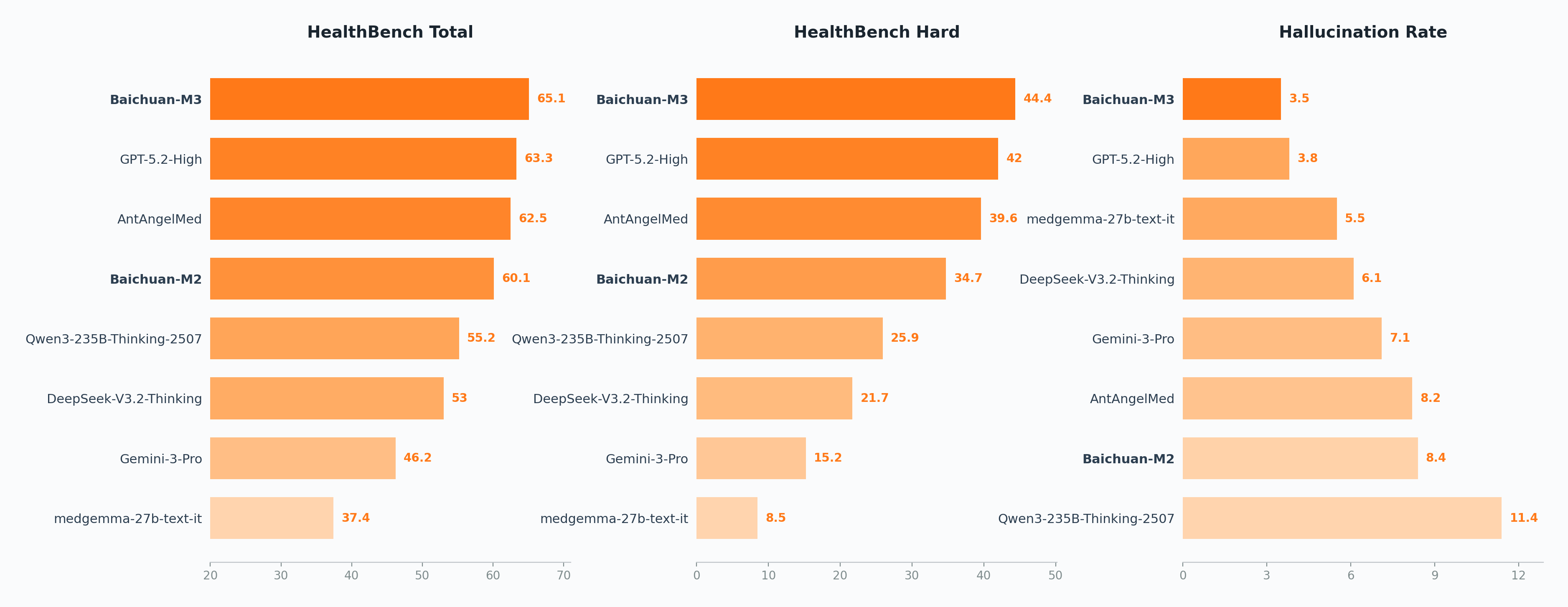
Compared to Baichuan-M2, Baichuan-M3 improves by 28 percentage points on HealthBench-Hard, reaching 44.4 and surpassing GPT-5.2. It also ranks first on the HealthBench Total leaderboard.
For hallucination evaluation, we decompose long-form responses into fine-grained, verifiable atomic medical claims and validate each against authoritative medical evidence. Even in a tool-free setting, Baichuan-M3 achieves lower hallucination rate than GPT-5.2.
SCAN-bench Evaluation
SCAN-bench is our end-to-end clinical decision-making benchmark that simulates the complete clinical workflow from patient encounter to final diagnosis, evaluating models' high-fidelity clinical inquiry capabilities through three stations: History Taking, Ancillary Investigations, and Final Diagnosis.
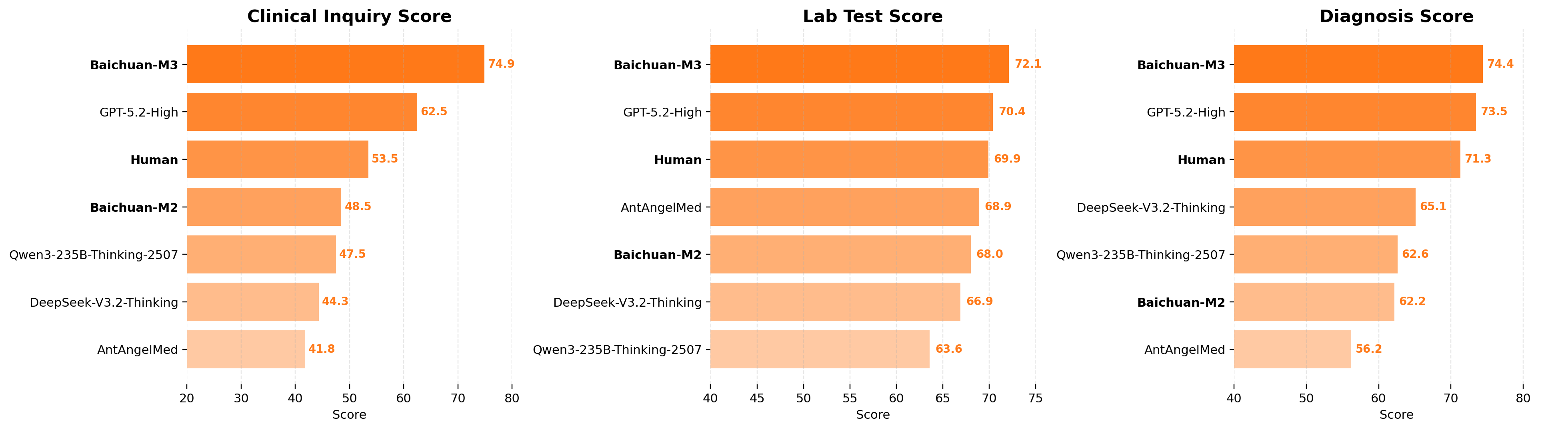
Baichuan-M3 ranks first across all three core dimensions, outperforming the second-best model by 12.4 points in Clinical Inquiry.
📢 The SCAN-bench will be open-sourced soon. Stay tuned.
🔬 Technical Features
📖 For detailed technical information, please refer to: Tech Blog
SPAR: Segmented Pipeline Reinforcement Learning
To address reward sparsity and credit assignment challenges in long clinical interactions, we propose SPAR (Step-Penalized Advantage with Relative baseline): it decomposes clinical workflows into four stages—history taking, differential diagnosis, laboratory testing, and final diagnosis—each with independent rewards, combined with process-level rewards for precise credit assignment, driving the model to construct auditable and complete decision logic.
Fact-Aware Reinforcement Learning
By integrating factual verification directly into the RL loop, we build an online hallucination detection module that validates model-generated medical claims against authoritative medical evidence in real-time, supported by efficient caching mechanisms for online RL training. A dynamic reward aggregation strategy adaptively balances task learning and factual constraints based on the model's capability stage, significantly enhancing medical factual reliability without sacrificing reasoning depth.
Efficient Training and Inference
Adopts a three-stage multi-expert fusion training paradigm (Domain-Specific RL → Offline Distillation → MOPD), combined with Gated Eagle3 speculative decoding (96% speedup) and W4 quantization (only 26% memory) for efficient deployment.
🔧 Quick Start
For deploying the Q4_K_M quantized model, you can use llama.cpp or ollama, please visit their website to get the specific operational steps for deploying the model.
⚠️ Usage Notices
- Medical Disclaimer: For research and reference only; cannot replace professional medical diagnosis or treatment
- Intended Use Cases: Medical education, health consultation, clinical decision support
- Safe Use: Recommended under guidance of medical professionals
📄 License
Licensed under the Apache License 2.0. Research and commercial use permitted.
🤝 Acknowledgements
- Base Model: Qwen3
- Training Framework: verl
- Inference Engines: vLLM, SGLang
Thank you to the open-source community. We commit to continuous contribution and advancement of healthcare AI.
📞 Contact Us
- Official Website: Baichuan AI
- Technical Support: GitHub
Advancing Medical AI from "Answering Correctly" to "Supporting Decisions"
📚 Citation
@article{Baichuan-M3 Technical Report,
title={Baichuan-M3: Modeling Clinical Inquiry for Reliable Medical Decision-Making},
author={Baichuan-M3 Team: Chengfeng Dou, Fan Yang, Fei Li, Jiyuan Jia, Qiang Ju, Shuai Wang, Tianpeng Li, Xiangrong Zeng, Yijie Zhou, Hongda Zhang, Jinyang Tai, Linzhuang Sun, Peidong Guo, Yichuan Mo, Xiaochuan Wang, Hengfu Cui, Zhishou Zhang},
journal={arXiv preprint arXiv:2602.06570},
year={2026}
}
- Downloads last month
- 41
4-bit
Model tree for baichuan-inc/Baichuan-M3-235B-Q4_K_M-GGUF
Base model
Qwen/Qwen3-235B-A22B



